What Is Phishing and How to Protect Yourself
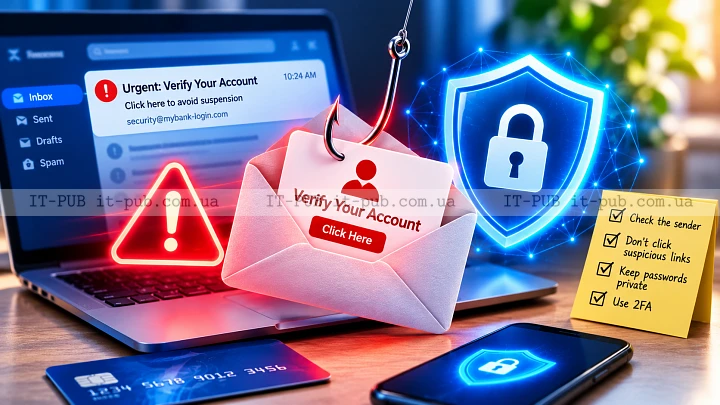
Phishing is still one of the easiest ways for attackers to steal information online. The method is simple: pretend to be someone you trust, then use that trust to get you to click a link, sign in, open a file, or share sensitive data. The encouraging part is that many phishing attempts are avoidable once you know what to look for.
What is phishing and why it works
What is phishing? At its core, it is a scam built on deception. The attacker tries to trick you into handing over passwords, payment details, personal information, or access to an account. The message might appear to come from your bank, a delivery company, a coworker, a cloud service, or a social platform you already use.
What makes phishing work is that it targets people more than technology. A phishing scam usually leans on urgency, fear, curiosity, or convenience. You might see a warning that your account is locked, a payment failed, a file is waiting, or some verification is needed right now. When people feel rushed, they are more likely to miss the warning signs.
That is why phishing keeps working across email, text messages, social platforms, and chat apps. It is not tied to one device or one service. It works by borrowing trust.
How phishing attacks usually begin
A phishing attack often starts with a message that feels familiar at first glance. The sender name may look legitimate. The branding may be close to the real thing. The wording may sound polished enough that you do not stop to question it.
Most of these messages try to push you toward one of three actions: click a link, download a file, or reply with information. In some cases, the link opens a fake login page designed to capture credentials. In others, it leads to a fake support chat or a fraudulent payment form.
The real purpose is usually hidden at the start. That is intentional. A phishing message works best when it feels ordinary enough that you stop checking the details.
Common signs of a phishing message
Many phishing attempts follow familiar patterns, even when the wording changes. One common sign is pressure. The message says something will expire, be suspended, or be deleted unless you act immediately. That artificial urgency is there to keep you from thinking clearly.
Another sign is inconsistency. The sender address may not match the company name in the message. A link may appear to point to one place while actually leading somewhere else. You may notice awkward wording, strange formatting, or small errors that do not fit the brand or organization being impersonated.
Attachments deserve extra caution. If a file arrives out of nowhere, especially one that asks you to enable content or macros, treat it carefully. The same goes for any message asking for personal data in a way a real company would not normally use.
No single clue proves a message is fraudulent. But when several of them show up together, you should assume something is off.
Why phishing is more than just email spam
A lot of people still associate phishing with fake email alone, but that is only part of the picture. A phishing attack can happen through SMS, phone calls, social media messages, fake login pages, and even ads or comments that send you to malicious sites.
Text-based phishing, often called smishing, can be especially effective because people tend to read texts quickly and treat them as more personal. Voice scams can be just as convincing when someone claims to be from tech support, a bank, or a delivery service.
There is also targeted phishing, often referred to as spear phishing. In those cases, the attacker tailors the message to a specific person or company. It may mention a real project, colleague, or service, which makes it much harder to recognize phishing on sight. That is why awareness matters even in organizations with strong security tools.
What happens if you click
Clicking a suspicious link does not always cause immediate damage, but it can start a chain of problems. You may land on a fake sign-in page that steals your username and password. You may be prompted to download a file that installs malicious software. In some cases, the site simply collects personal information for later abuse.
Once attackers get access to one account, they often try the same credentials elsewhere. Since many people still reuse passwords, one stolen login can unlock several accounts. That is how a phishing email can lead to account takeover, identity theft, financial loss, or unauthorized access to workplace systems.
The damage is not only technical. Recovering a compromised account takes time, and it can be stressful. For businesses, one successful phishing attack may also expose internal documents, customer information, or payment systems.
How to recognize phishing before it fools you
The best habit is also the simplest: slow down. If a message asks you to do something important, take a moment before you respond. Check the sender carefully. Look at the full email address, not just the display name. If possible, compare it with earlier legitimate messages from the same organization.
Check the link destination before opening it. On many devices, you can preview the address by hovering over it or pressing and holding it. A legitimate link should match the company’s real domain. If it looks almost right but not quite, that is a strong warning sign.
It also helps to ask a basic question: does this request make sense? A bank may alert you to account activity, but it usually will not ask for your password through an email link. A delivery service may send a tracking update, but a routine message should not require you to log in through an unexpected page. If something feels unusual, verify it through a trusted channel instead of replying directly.
How to protect against phishing in daily life
If you want to know how to protect against phishing, start with a mix of caution and a few solid security habits. Use strong, unique passwords for important accounts. If one password is stolen, unique passwords keep the problem from spreading. A password manager can help a lot here by storing credentials securely and reducing the temptation to reuse them.
Two-factor authentication adds another layer. If someone gets your password, they still need a second step to access the account. It is not flawless, but it blocks many common takeover attempts.
It also helps to keep your software up to date. Browser, operating system, and app updates often include security fixes that reduce the chance of a malicious link or file doing damage. Built-in spam filters and security warnings are useful too, though they should not be your only line of phishing prevention. Some malicious messages will still get through.
Another good habit is sharing less personal information in public. Attackers use details from social profiles, company pages, and data leaks to make a phishing scam look more convincing. The less context they have, the harder it is to tailor the message.
Safer habits when checking email and messages
Small habits make a real difference. Read messages with a bit of skepticism when they ask you to log in, pay, confirm your identity, or download something. If a phishing email appears to come from someone you know but feels unusual, verify it another way.
Do not use links inside a suspicious message to sign in. Go directly to the official site or app instead by typing the address yourself or using a trusted bookmark. That one step helps you avoid one of the most common tricks: a fake page designed to look almost identical to the real one.
Be careful with attachments too, especially when they arrive unexpectedly. If you are not sure why a file was sent, confirm it through a separate contact method before opening it. In a work setting, that matters even more, because one compromised device can affect a much larger network.
What to do if you suspect phishing
If you think a message may be phishing, do not click anything in it. If the platform allows it, mark it as spam or report it. That helps protect other users as well.
If you already entered a password on a suspicious site, change it right away on the real service. If you reused that password anywhere else, change those accounts too. Turn on two-factor authentication if it is available. If payment or banking details may have been exposed, contact your bank or card provider immediately.
If you opened a file or approved something you should not have, disconnect the device from the internet if you suspect malware and get help from a trusted IT specialist or support team. Speed matters here. The sooner you react, the better your chances of limiting the damage.
It is also worth watching for follow-up attempts. Once attackers see that someone responded, they may come back with more believable messages built around the same theme.
How businesses can reduce phishing risk
Organizations deal with the same problem, just at a larger scale. The basics still matter: strong authentication, regular updates, and careful access control. Employees need practical training that shows what suspicious messages actually look like, not just a list of abstract rules.
Technical safeguards matter too. Email filtering, domain protection, and login alerts can reduce exposure. Least-privilege access helps limit the damage if one account is compromised. Backups and incident response plans are just as important, because no security setup catches everything.
Culture matters as much as tooling. People should feel comfortable reporting suspicious messages quickly, even if they already clicked something by mistake. Fast reporting can stop a single phishing attempt from turning into a wider incident.
Building a phishing-resistant mindset
The goal is not paranoia. It is verification. Treat unexpected messages with caution, especially when they ask for sensitive action. Pause, inspect, and confirm before you respond.
Over time, that becomes automatic. You stop trusting urgency. You start trusting process. You check senders, verify links, protect accounts more carefully, and keep software current. None of these steps is complicated, but together they make phishing far less effective.
Phishing will keep changing its appearance, but the core trick stays the same: it tries to rush you into a bad decision. Slow the process down, and you remove a lot of its power.