What Is Cybersecurity and How to Protect Data
Cybersecurity is part of everyday digital life, even when you barely notice it. It protects devices, accounts, networks, and data from theft, damage, and unauthorized access. Once you understand the basics, it becomes much easier to stay safe online and make smarter choices about the tools and habits you rely on.
What cybersecurity really covers
At its simplest, cybersecurity is the practice of protecting digital systems and information. That includes laptops, phones, cloud accounts, websites, email, and the networks connecting them. It also includes the people using those systems, because plenty of security problems begin with human error, not failed software.
The point is not just to stop hackers. Good cybersecurity also helps prevent accidental data loss, malware infections, account takeovers, and misuse of sensitive information. In real life, it comes down to a mix of technology, process, and everyday behavior.
That is also why it is not only an IT issue. Cybersecurity matters to individuals, small businesses, schools, hospitals, and large companies. If you store or share digital information, some level of protection is necessary.
Why data protection matters so much
Data matters because it can reveal identity, finances, private communication, business plans, and access to other systems. When data is exposed, the damage rarely stays in one place. A stolen password can lead to an email account. That email account can open the door to cloud storage. Cloud storage can expose even more sensitive files.
Data protection is really about breaking that chain reaction. The goal is to keep information private, accurate, and available only to the right people. Put simply, it reduces the chance that data is viewed, changed, or deleted by someone who should not have access.
For businesses, the fallout can mean downtime, lost trust, legal trouble, and financial loss. For individuals, it may mean identity theft, fraud, or the loss of personal photos and documents. The details vary, but the principle stays the same: protect information before it turns into a bigger problem.
The main threats people face online
Cyber threats come in many forms, but the most common attacks usually follow a few familiar patterns. Phishing is one of the clearest examples. It uses fake emails, messages, or websites to trick people into giving away passwords, payment details, or other sensitive data. The message may look convincing, which is exactly why it works.
Malware is another major risk. This is software built to damage devices, monitor activity, or steal information. It can arrive through unsafe downloads, malicious attachments, or compromised websites. Once installed, it may keep running quietly in the background.
Weak passwords are still a serious issue. If a password is easy to guess or reused across multiple accounts, one breach can open several doors at once. Attackers often test stolen password lists on other services because so many people reuse the same login details.
Some threats target websites and systems more directly. That can mean exploiting software flaws, flooding services with traffic, or using stolen credentials to get access. The technical methods differ, but the outcome is similar: exposed data and vulnerable systems.
Cybersecurity basics that make a real difference
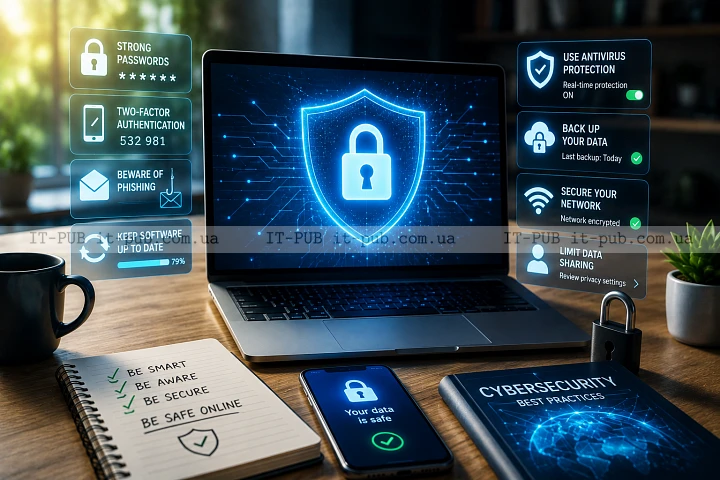
Strong protection does not always require advanced tools. A lot of effective cybersecurity basics are simple habits repeated consistently. One of the most important is using strong, unique passwords for every account. A password manager can make that much easier by creating and storing them securely, so you are less likely to fall back on weak or repeated logins.
Multi-factor authentication adds another layer of protection. After the password, it asks for a second proof of identity, such as a code or app confirmation. Even if a password is stolen, the account is still much harder to break into. For most people, this is one of the most practical steps they can take.
Software updates matter for the same reason. They often fix security weaknesses, not just add features. When updates are delayed, known gaps stay open longer than they should. That applies to operating systems, browsers, apps, plugins, and network devices.
Backups belong on the list too. If files are lost, encrypted by ransomware, or deleted by mistake, a backup can make recovery possible. It only helps, though, if it is stored separately from the main device and checked from time to time.
How to protect data in everyday life
If you want to know how to protect data, start by understanding what is actually sensitive. Not every file needs the same level of care, but some information clearly deserves more attention. Financial records, identity documents, private messages, client data, and login details should all be handled carefully.
It also helps to share less information than feels convenient. The more data you put online, the more places it can be exposed. Review app permissions, privacy settings, and account recovery options. If a service asks for access that does not seem necessary, it is worth questioning.
Public Wi-Fi needs a bit of caution too. Open networks are convenient, but they are not always safe for sensitive activity. Avoid signing into critical accounts or sending private information unless you trust the connection and the site uses secure encryption. A virtual private network can add privacy in some cases, but it is not a complete fix.
Physical security still matters. A stolen phone or laptop can easily become a data breach if the device is not locked properly. Use a screen lock, device encryption when available, and remote wipe features where appropriate. Simple steps in the physical world often prevent bigger online security problems.
Safe habits for email, links, and downloads
Email is still one of the easiest ways for attackers to reach people. A message may seem urgent, friendly, or completely routine, but the real goal is often to get you to act too quickly. Pause before clicking links or opening attachments, especially if the message asks for money, login details, or immediate action.
Look closely at the sender. Small spelling changes, unusual domain names, or messages that do not match the tone of the organization they claim to represent can all be warning signs. If something feels wrong, verify it through a separate channel instead of replying directly.
Downloads deserve the same level of attention. Install software only from trusted sources. Be careful with browser extensions, free utilities, and files shared through unfamiliar links. Something that looks harmless can still carry hidden risks if you do not know where it came from.
Keeping browsers and email clients updated helps as well. Many attacks depend on outdated software behavior. A current version lowers the odds that one careless click turns into a serious issue.
What businesses should focus on
For organizations, what is cybersecurity really about in practice? It is not just blocking attacks. It is managing risk in a way that fits the size and nature of the business. That starts with knowing where data is stored, who can access it, and what happens if it is lost or exposed.
Access control is one of the biggest priorities. Employees should only be able to reach the data and systems they actually need for their work. When sensitive information is available to too many people, the risk of accidental or intentional misuse goes up.
Training matters just as much. Many incidents start with someone clicking a link, sharing a password, or sending a file to the wrong person. Regular awareness training helps staff recognize common threats and respond more carefully. It works best when it stays practical instead of drifting into overly technical detail.
Businesses also need an incident plan. If something goes wrong, people should know who to contact, what to isolate, and how to protect evidence. A clear response plan reduces confusion and can limit the damage. Digital safety is always stronger when preparation is part of the routine.
Common mistakes that weaken protection
One of the most common mistakes is assuming small accounts do not matter. Attackers often use a less protected account as a starting point for broader access. A personal email address, cloud storage account, or old social profile can still become a gateway.
Ignoring alerts is another problem. Security warnings from a browser, operating system, or service provider are worth checking. They are not flawless, but they often point to something real, such as a suspicious login or an update that should not be postponed.
People also tend to trust convenience more than they should. Automatic sign-ins, saved passwords on shared devices, and quick file sharing can save time, but they also increase exposure if the device or account is compromised. Convenience has value, but it needs limits.
A lot of users wait until after an incident to think about backups, recovery settings, or account recovery codes. By then, options may already be narrower. Good protection is mostly about reducing the impact of mistakes and attacks before they happen.
A simple way to build stronger digital safety
A useful routine does not need to be complicated. Start with the basics: use unique passwords, turn on multi-factor authentication, keep devices updated, and back up important files. Then review which accounts and apps can access your data.
After that, pay attention to behavior. Be careful with unexpected messages, do not rush through login prompts, and pause before sharing sensitive information. Small habits make a bigger difference than they seem to at first.
If you manage business or family devices, it also helps to set clear rules that people can actually follow. Make sure everyone knows how to spot suspicious emails, where backups are stored, and what to do if a device is lost. Clear habits are easier to maintain than vague warnings.
Cybersecurity is not about perfect safety. That is not realistic. It is about making attacks harder, reducing mistakes, and protecting data well enough that one issue does not turn into several. When the basics are in place, digital life becomes safer and a lot less stressful.