What Is a VPN and Why People Use One
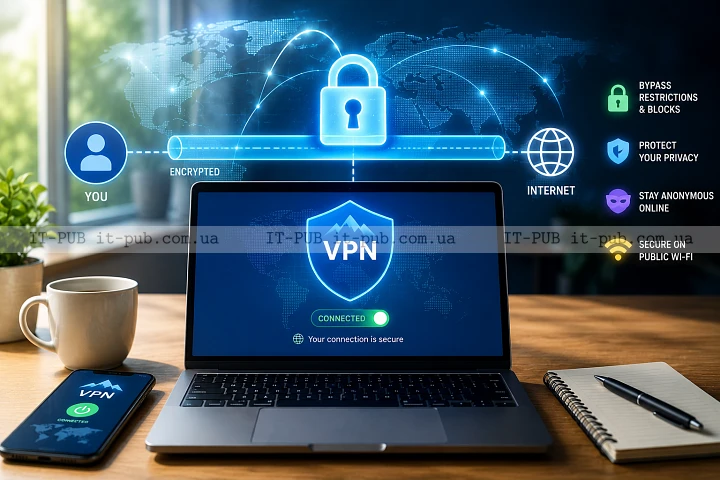
What is a VPN, and why do so many people bother using one? In simple terms, it’s a tool that creates a more private connection between your device and the internet. It won’t make you invisible online, but it can give you an extra layer of protection and a bit more control over how your traffic moves.
For some people, the main reason is privacy. For others, it’s about staying safer on public Wi-Fi, getting a more consistent connection, or limiting how much of their online activity is exposed.
What a VPN does in simple terms
VPN meaning is straightforward once you strip away the technical name. VPN stands for Virtual Private Network, and the core idea is simple: it creates an encrypted tunnel for your internet traffic. Data leaving your device is wrapped in a protected layer before it travels across the network.
Without a VPN, your traffic usually goes straight from your device to your internet provider and then on to the website or app you’re using. With a VPN, that traffic goes to the VPN service first, and only then to its destination. That extra step helps hide your real IP address from the sites you visit and makes it harder for others to inspect your traffic while it’s in transit.
That said, a VPN is not the same thing as full anonymity. It doesn’t erase your digital footprint, and it won’t stop websites from tracking you through cookies, account logins, or browser fingerprinting. What it can do is reduce exposure in situations where network traffic is easier to watch.
How a VPN works behind the scenes
If you’re wondering how VPN works, the basic process is fairly easy to follow. When you switch on a VPN app, it connects your device to a VPN server. The app and the server then establish an encrypted connection. From that moment on, your internet requests travel through that protected path.
To anyone watching from the outside, the traffic mostly looks like encrypted data going to the VPN server. The websites you open see the VPN server’s IP address rather than your own. Your internet provider can usually tell that you’re connected to a VPN, but not the detailed contents of the traffic moving through the tunnel.
This matters most on networks you don’t control. It can also be useful when you want a different public IP address for a session, which may change how some services handle your connection.
Why people use a VPN
Why use a VPN? The answer depends on the person. Not every reason is especially technical. One of the biggest is privacy. A lot of users simply don’t want to expose their browsing activity more than necessary.
Another common reason is security on shared networks. A VPN on public Wi-Fi can help protect data as it moves through places like cafes, airports, hotels, and other networks used by many people at once. That makes it harder for someone nearby to intercept sensitive information.
Some people use a VPN to reach work resources securely. In that setup, the VPN acts as a protected bridge between a remote device and a private company network. It’s a standard approach in many business environments and helps employees access internal systems without exposing them broadly to the internet.
Others turn to VPNs to get around some forms of network-based throttling or filtering. In some situations, a VPN may help traffic move more consistently, though it’s not a guaranteed fix for speed problems.
What a VPN can protect, and what it cannot
A VPN is useful, but it’s not a magic shield. It protects the connection between your device and the VPN server. That’s important, though it’s only one part of staying safe online.
A VPN for privacy can help keep network traffic less visible to local observers, internet providers, and some other third parties. It can also limit how much your IP address reveals. What it cannot do is protect you if you sign in to a fake website, download malicious software, or send sensitive information to the wrong person.
It also doesn’t stop services from knowing who you are once you log in. If you open your email, social media, or banking app, those services still know it’s you. A VPN doesn’t replace strong passwords, two-factor authentication, or careful browsing habits.
When a VPN is especially useful
A VPN makes the most sense when you’re using a network you don’t fully trust. Public Wi-Fi is the obvious example. If you need to check email, send files, or sign in to accounts on a shared network, a VPN can add another layer of safety.
It’s also useful for remote work. Many organizations rely on VPNs to let staff securely reach internal tools, file shares, or admin systems from outside the office. In that case, the VPN is part of a company’s broader access control strategy.
Some people also use VPNs because they want more privacy from their internet provider. A VPN won’t hide everything, but it can reduce how much detail is visible along the local network path.
If you travel often or work from different locations, a VPN can also help create a more controlled and consistent connection across networks that may behave very differently from one place to another.
Common VPN misconceptions
One of the biggest myths is that a VPN makes you completely anonymous. It doesn’t. If you log in to accounts, accept tracking cookies, or share personal details on a site, the VPN can’t reverse that.
Another misunderstanding is that a VPN automatically protects you from every cyber threat. It won’t block every malicious site, and it doesn’t replace antivirus software or basic device security. It’s better to think of it as one layer in a bigger security setup.
People also assume all VPNs are basically the same. They aren’t. Services can differ a lot in privacy practices, connection quality, app design, server locations, and the way they handle user data. Those details matter.
One more practical point: a VPN can sometimes slow your connection down. Your traffic is taking an extra route, and it has to be encrypted. Often the slowdown is minor, but it does happen.
How to choose a VPN without overcomplicating it
If you’re choosing a VPN for personal use, start with the basics. Look for something easy to understand, stable in daily use, and clear about how it handles data. A transparent privacy policy matters more than polished marketing.
The app should also be simple enough that you’ll actually use it. If turning it on feels like a chore, people stop doing it, and then the tool stops being useful.
Reliability matters too. A VPN that disconnects often can interrupt work or browsing and quickly become frustrating. Speed matters as well, but it should be weighed alongside privacy and trust rather than treated as the only thing that counts.
It also makes sense to check whether the VPN supports the devices you really use. The best option is one that fits naturally into your routine instead of forcing you to work around it.
What to watch out for before trusting a VPN
A VPN service sits in a sensitive spot. It can see a lot about your connection, even if it can’t read everything inside encrypted websites and apps. That’s why trust matters so much.
Be careful with providers that make vague promises or exaggerate what a VPN can do. Claims of total anonymity or complete protection from all tracking should raise questions. Real security tools have limits, and reputable services tend to explain those limits clearly.
It’s also worth looking at app permissions, support quality, and how easy it is to find information about the company behind the service. Transparency is usually a good sign. So is a plain explanation of what data is collected and why.
Free VPNs deserve a closer look. Some are legitimate and useful. Others may depend on aggressive advertising, data collection, or weak security practices. If a service is free, it still has to cover its costs somehow.
VPNs in business and remote work
In business settings, VPNs are often used to protect access to internal systems. Instead of exposing databases, file servers, or admin dashboards directly to the public internet, the company allows access through a secured tunnel. That reduces exposure.
For employees, this can make remote work easier. Someone working from home can connect to internal tools much as if they were on the office network, while the company keeps tighter control over who can reach what.
Business VPNs aren’t just about convenience. They’re part of a wider access strategy that helps limit risk while supporting secure communication.
VPNs and everyday privacy habits
A VPN works best as part of a broader privacy routine. Using one on public Wi-Fi is smart, but so is keeping your software updated, using unique passwords, and turning on two-factor authentication where possible.
Browser settings matter too. If you want less tracking, clearing cookies, limiting third-party trackers, and using privacy-focused browser features can help. A VPN and browser privacy tools solve different problems, which is why they work well together.
It’s also worth thinking about what you choose to share online. A VPN can hide part of your network path, but it can’t protect information you willingly post, upload, or type into forms.
When you may not need a VPN
Not everyone needs a VPN all the time. If you’re on a trusted home network and just doing ordinary browsing, the benefit may be smaller. Some people only use one when they leave home, travel, or need a secure internet connection for work.
There are also cases where a VPN isn’t necessary for a specific task because the website or app already uses strong encryption. Many modern services do. Even then, a VPN can still add privacy by hiding the connection route, but it isn’t always essential.
The real point is to match the tool to the situation. A VPN is most useful when you want more privacy, safer use of shared networks, or secure access to private systems.
The practical takeaway
So, what is a VPN in practical terms? It’s a simple tool with clear real-world benefits. It encrypts your traffic, changes how your connection appears to the outside world, and helps protect data on networks you don’t fully trust.
It’s not a cure-all. It won’t make you invisible, and it won’t replace basic security habits. Still, used for the right reasons, a VPN can be a practical part of safer and more private internet use.
For beginners, the key idea is easy to remember: a VPN helps protect your connection and reduce exposure. For more experienced users, it’s another useful control that fits into a broader security and privacy setup.