How UX Design Improves Digital Products
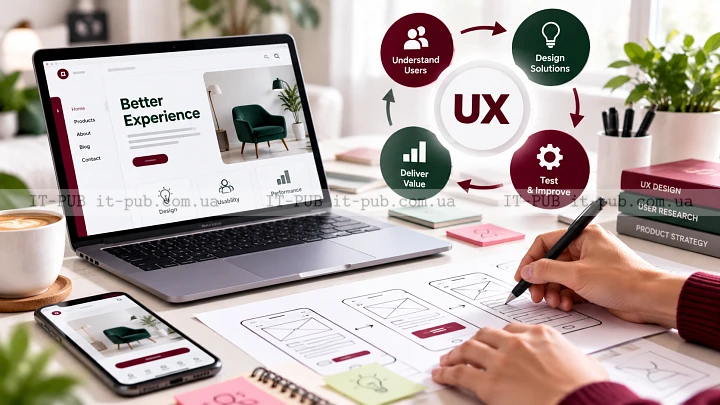
UX design is the practice of making digital products easier, clearer, and more comfortable to use. It looks at how people move through an app, website, or service, and whether they can reach their goal without getting stuck or second-guessing what to do.
When UX design is done well, it almost disappears. People do not stop to think about the work behind it. They find what they need, understand the next step, and complete the task without unnecessary effort.
What UX design really means
UX stands for user experience. In plain terms, it describes the full experience a person has while using a product. That includes the structure of the interface, the clarity of the content, the pace of the flow, and even the impression the product leaves behind.
User experience design is not the same as making something look good. Visual style matters, but it is only one part of the whole. A product can look polished and still feel frustrating to use. On the other hand, something visually simple can feel efficient, thoughtful, and reliable.
At its core, UX design is about reducing friction. The goal is to help users complete tasks with as little confusion, delay, or frustration as possible. That only works when design decisions are based on real behavior rather than assumptions.
Why UX design matters for digital products
Every digital product depends on people being able to use it with ease. If a website feels confusing, users leave. If an app is hard to navigate, people stop coming back. If a form feels too long or unclear, many users drop off before they finish.
That is why UX design matters across almost every kind of digital experience. It affects whether someone can sign up, find a product, read a page, book a service, or complete a purchase. In business environments, it can also cut down on support requests and save time for internal teams.
It matters for another reason too: UX design connects user needs with business goals. Products that are easier to use usually perform better. People are more likely to trust them, return to them, and recommend them.
How UX design starts with understanding people
A solid UX process starts with understanding users. Designers need to know who they are, what they are trying to do, and where things break down for them. Without that foundation, decisions are built on guesswork, and guesswork tends to fail.
User research can take different forms. It might involve interviews, surveys, observation, analytics reviews, or support feedback. The point is not to gather information for the sake of it. The point is to understand how people think and behave in real situations.
This stage often uncovers practical details teams would otherwise miss. Users may not understand certain terms. They may expect a different sequence of steps. They may hesitate when asked for too much information at once. Insights like these shape everything that follows.
Turning research into a clear structure
Once the team has a better understanding of users, the next step is to shape the experience into something clear and usable. This is where information architecture matters. It is the logic behind how content, features, and navigation are organized.
A strong structure helps people move through a product without feeling lost. Menus should be easy to understand. Labels should say what users expect them to say. Related content should sit together in a way that feels natural. When the structure is weak, users end up doing too much mental work just to find their way.
At this point, teams often map user journeys. A user journey shows the steps a person takes to complete a task. It helps reveal where the experience feels smooth and where it starts to break apart. That makes it easier to simplify the flow before moving deeper into product design.
From ideas to wireframes and prototypes
After the structure is in place, designers usually move on to wireframes. A wireframe is a simple layout that shows the basic shape of a screen without final visual styling. It focuses on hierarchy, placement, and flow rather than color or decoration.
Wireframes are useful because they let teams discuss the experience early, while changes are still easy to make. They help people move elements around, compare options, and test ideas without spending too much time polishing visuals too soon. That saves effort and lowers the risk of building the wrong thing.
Prototypes take the idea further. They can simulate how a product will work, so people can click through screens and get a feel for the interaction. This matters because a flow that looks fine in a sketch can feel awkward once someone actually tries to use it.
Testing ideas before they become problems
Usability testing is one of the most valuable parts of UX design. It means watching real users try to complete tasks with a product or prototype. Designers look for the moments where people hesitate, misread instructions, or take an unexpected path.
It does not have to be complicated to be useful. Even a small number of sessions can reveal clear patterns. What matters is paying attention to behavior instead of relying only on opinions. People do not always do what they say they will do.
Testing feedback often leads to small but meaningful changes. A button may need clearer wording. A form may need fewer steps. Navigation may need to stand out more. These are not dramatic changes, but they can make a noticeable difference to the overall experience.
UX design and UI design are related but not the same
UX design and UI design are closely connected, but they are not the same thing. UX design focuses on the full experience. UI deals with the parts of the interface people directly see and interact with, such as buttons, spacing, typography, and color.
The two work best together. UX design shapes the logic, flow, and structure. UI supports that flow by making the interface clear and usable. A polished interface can improve a good experience, but it cannot repair a broken one underneath.
This distinction matters because design is often mistaken for surface-level styling. In reality, the strongest interfaces usually come from careful UX thinking first. The visual layer works better when the experience itself already makes sense.
What makes a UX design feel good to use
A good user experience usually comes down to a few qualities. It feels clear, consistent, and predictable. It helps people understand where they are, what they can do, and what will happen next.
Clarity comes first. Users should not have to decode vague labels or guess what a screen is for. Consistency matters just as much, because familiar patterns reduce mental effort. When similar actions behave in similar ways, people learn faster and make fewer mistakes.
Good UX design also respects attention. It avoids unnecessary steps, keeps clutter under control, and presents information in a logical order. When a product feels calm and purposeful, it becomes easier to trust.
Accessibility is part of that too. A product should work for as many people as possible, including users with visual, motor, or cognitive limitations. Accessible choices improve the experience for everyone, not just for one group.
How UX design fits into product development
UX design is not a one-time stage that starts and ends in isolation. It is usually part of an ongoing product process. Designers, developers, product managers, content specialists, and researchers may all contribute at different moments.
In a healthy workflow, UX design influences decisions early. It helps define the problem before teams start building solutions. It also continues after launch, because real usage data and user feedback often reveal issues that were not obvious before.
That iterative way of working matters. Products change, and so do user expectations. A design that works well at one point may need adjustment later. UX design supports that cycle by keeping the user experience under review instead of treating it as finished.
Common mistakes in UX design
One of the most common mistakes in UX design is building around internal preferences instead of user needs. Teams may choose a structure that makes sense inside the organization, even if users think about the product in a completely different way. That mismatch creates friction fast.
Another problem is unnecessary complexity. Extra fields, extra steps, and too many choices can make a product feel heavier than it needs to be. Simplicity is not about stripping out useful detail. It is about making sure every part of the experience has a reason to be there.
Skipping usability testing is another frequent mistake. Even experienced teams miss things when they rely only on instinct. Real users often expose problems that stay invisible during planning.
Content can also be overlooked. Clear interfaces depend on clear language. If labels, instructions, and messages are vague, the product becomes harder to use no matter how carefully the screens are arranged.
How beginners can think like UX designers
You do not need to be a specialist to start thinking like a UX designer. It begins with paying attention. Notice where people get stuck, what they ignore, and which steps they repeat. Watch for the parts of an experience that feel harder than they should.
It also helps to ask a few practical questions during design work. What is the user trying to achieve right now? What information do they need at this moment? What can be removed without making the task harder? What might confuse someone using the product for the first time?
Another useful habit is testing early instead of waiting for everything to feel finished. Rough sketches, basic wireframes, and simple prototypes can already show whether an idea makes sense. In most cases, early feedback is more useful than polished assumptions.
Why UX design keeps evolving
UX design changes along with technology and behavior. People use more devices, expect faster interactions, and move between channels more naturally than before. That forces teams to keep adapting how they plan, test, and evaluate experiences.
Still, the core ideas remain steady. Understand the user. Reduce friction. Make the path clear. Test with real people. Improve based on evidence. Those principles continue to hold up no matter how products or platforms change.
That is what makes UX design so practical. It is not a trend, and it is not just a decorative layer in digital work. It is a disciplined approach to building products around how people actually use them.
When UX design is done right, it fades into the experience itself. The product simply feels sensible. And in digital products, that feeling often marks the difference between something people merely tolerate and something they genuinely trust.