How to Create a Strong Password That Holds Up
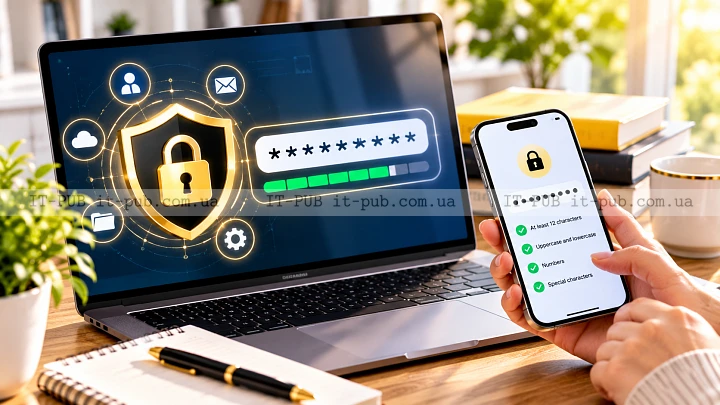
How to create a strong password is one of those basic security skills that ends up protecting almost everything you do online. A weak password can put your email, banking, work accounts, and personal data at risk very quickly. The good part is that a strong password does not have to be so complicated that it becomes a problem to use.
What matters most is length, unpredictability, and a few solid habits. That may sound a bit technical at first, but the idea is simple enough. You want a password that is difficult for both people and software to guess, while still being something you can realistically manage.
What makes a password strong
A strong password is not just a messy string of symbols and letters. It is a password that can stand up to common attacks, including guessing attempts, leaked password databases, and automated cracking tools.
Length does a lot of the heavy lifting. In most cases, a longer password is harder to break than a short one, even if the short one includes special characters. Unpredictability matters just as much. If your password includes your name, birthday, pet’s name, or a common word with a minor tweak, it is still far easier to crack than it looks.
Uniqueness matters too. Reusing the same password across different accounts creates a domino effect. If one service gets breached, every other account using that same password is suddenly exposed.
Why common password habits fail
A lot of people still choose passwords that feel easy to remember but are also easy to predict. That includes repeated characters, keyboard patterns, and simple substitutions like changing “a” to “@” or “o” to zero.
Those tricks are not really tricks anymore. They are well known, and attackers build them into their tools. They do not sit there guessing from scratch. They work from huge lists of common passwords and familiar variations. They also try personal details that are often easy to find through social media or public profiles.
Another habit that causes trouble is using one “master” password everywhere. It may save time, but it also increases the damage if that password is exposed. Good password security is partly about limiting the fallout when something goes wrong.
A practical way to build a strong password
The easiest way to create a secure password is to start with length and then add randomness. In many cases, a passphrase works better than a short, complicated string. A passphrase is a sequence of unrelated words or a phrase-like combination that is easier for you to remember and harder for someone else to predict.
A password built from several unrelated words is often stronger than a short password stuffed with symbols. The important part is that the words should not come from a famous quote, a common expression, or anything tied to your personal life.
You can make it stronger by adding numbers or symbols in places that are not obvious. The goal is not complexity for the sake of it. The goal is to make the password less predictable without making it miserable to use.
If you prefer completely random passwords, that is even better from a security standpoint. The tradeoff is memorability. That is where a password manager becomes especially useful.
What to avoid when creating a password
Skip personal details. Birthdays, phone numbers, street names, children’s names, and favorite teams are easier to guess than many people realize. Even a long password gets weaker when it includes clues about your life.
Avoid using single dictionary words on their own. That is one of the first things attackers try. The same goes for simple combinations like “Summer2025” or “Password123.” They may look stronger than they are, but they are still weak choices.
Obvious transformations do not help much either. Replacing letters with numbers or adding one exclamation mark at the end is not enough. Automated tools are built to catch patterns like that.
Short passwords are also a problem, even when they look complex. A short password with symbols can still be easier to crack than a longer phrase with no symbols at all.
Strong password tips that actually help
If you want strong password tips that hold up in real life, start with uniqueness. Every important account should have its own password. Your email account deserves extra attention because it often controls password resets for everything else.
Use passwords that are long enough to resist guessing and random enough to avoid familiar patterns. If one is easy for you to remember because it has a natural rhythm, that is fine, as long as it is not based on a common phrase.
For extra protection, turn on multi-factor authentication wherever you can. It does not replace a strong password, but it does help if a password is stolen. That extra step makes it much harder for someone to get into your account with only the password.
If you know or suspect a password has been exposed, change it quickly. Routine password changes are not as important as they once seemed, but replacing compromised passwords still matters. Good security is not just prevention. It is also about responding fast when needed.
How to remember a secure password
People often assume that a secure password has to be impossible to remember. Not always. A well-made passphrase can be both memorable and strong.
One approach is to build a phrase from unrelated words and give it a small structure that makes sense to you. The words should not connect to your personal life. The more random the combination, the better. Another option is to start with a sentence you would naturally remember and then transform it in a way that is not obvious to anyone else.
Still, there is a limit to what memory can handle. If you manage a lot of accounts, remembering every unique password is not realistic. That is one of the clearest reasons to use a password manager. It stores passwords securely and helps generate strong ones without forcing you to memorize each one.
Why password managers are worth considering
A password manager makes good password habits much easier to keep. Instead of reusing the same password or writing passwords down in unsafe places, you store unique passwords in one protected location.
That helps in two important ways. First, it removes a lot of the temptation to reuse passwords. Second, it lets you use long, random passwords for the accounts that matter most. That is a big improvement over relying on memory alone.
It also makes logging in faster and less frustrating. You do not have to come up with a new memorable password style for every site. The tool handles the complexity, and you can focus on protecting one strong master password and the accounts connected to it.
How to protect the password itself
Knowing how to create a strong password is only part of the job. You also need to protect how that password is stored and used.
Try not to share passwords through email or chat. If access has to be shared, use a secure method meant for that purpose. Avoid storing passwords in plain text files, notes apps without proper protection, or browser autofill on shared devices unless you fully understand the risk.
Be careful on public or shared computers. If you sign in on a device that other people can access, make sure you log out completely and do not save credentials. On your own devices, keep the operating system and browser updated so known security issues are patched.
And watch for phishing. Even the best password will not help if you type it into a fake login page. Check the site address carefully, especially when you arrive through a link in an email or message.
Password strength and different types of accounts
Not every account carries the same level of risk, but some clearly deserve extra protection. Email is usually at the top of the list because it can reset other passwords. Banking, cloud storage, work systems, and accounts that hold personal documents should also be treated as high priority.
Even low-risk accounts should still get a strong, unique password. That limits the damage if a smaller site is breached. The point is to keep one weak account from turning into a bigger security problem.
If an account offers multi-factor authentication, use it. If it supports passkeys or other modern sign-in options, those can be more convenient and more secure than passwords alone. Still, passwords remain widely used, which is why it still matters to know how to create a strong password properly.
Simple mistakes that weaken good passwords
Sometimes the password itself is fine, but the way it is used creates the problem. Writing it on a sticky note near your monitor is an obvious example. Saving it somewhere that other people can easily access is another.
A similar mistake is making small variations of the same base password for different sites. If one version is exposed, that pattern can help attackers guess the rest. Unique passwords need to be genuinely unique.
It is also risky to assume a password stays safe forever. Security changes over time. Accounts get breached, devices are lost, and people slip up. Good password best practices include checking your habits now and then and tightening them up when needed.
A realistic password strategy for everyday use
A practical password strategy does not need to be perfect. It needs to be sustainable.
If possible, use a password manager for most of your accounts. Create one strong master password and protect it carefully. For the accounts you use most often, make sure the passwords are unique and long enough to resist guessing. For the accounts that matter most, add multi-factor authentication.
If you would rather remember a few passwords yourself, keep that to a small number of accounts and make each password distinct. Do not let convenience pull you back into password reuse. That is where a lot of avoidable security problems start.
The best approach is the one you can keep following without cutting corners. Security works better when it fits into normal behavior instead of constantly fighting against it.
Building better habits over time
Learning how to create a strong password is really about changing habits. Once you stop relying on short, predictable passwords, everything else gets easier. You start thinking in terms of uniqueness, length, and protection, not just what is easiest to remember.
That shift pays off across your digital life. Strong passwords lower the risk of account takeovers, reduce the impact of breaches, and make everyday online activity safer without requiring advanced technical knowledge.
A memorable password can still be a strong one. It does not need to be perfect. It needs to be hard to guess, different from your other passwords, and stored in a way that does not expose it. Keep those basics in mind, and you will already be avoiding many of the most common password mistakes.