How Contactless Payment Works Day to Day
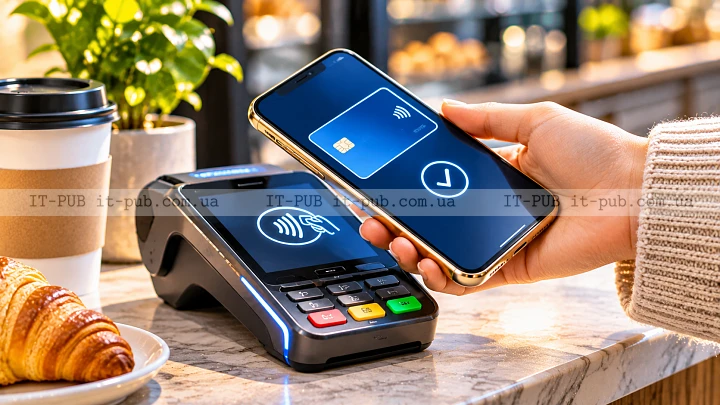
How contactless payment works is simpler than it may seem at first. You hold a card, phone, or another device near a payment terminal, and the transaction goes through without inserting the card or handing it to anyone. That quick tap feels effortless, but there is real technology and a series of security checks behind it that make the process fast and usable in everyday life.
For a lot of people, contactless payment is now the default. It speeds up checkout, cuts down on physical handling, and works in all kinds of routine situations. And if you understand what is happening in the background, the whole process makes a lot more sense.
The simple idea behind a tap payment
A contactless payment is a card or device payment that uses short-range wireless communication. Instead of reading a chip through insertion or swiping a magnetic stripe, the terminal and the payment device exchange information when they are brought close together.
From the user side, it is deliberately simple. You unlock your phone or tap your card, wait for the confirmation, and move on. The goal is convenience, but not convenience alone. It is also about removing extra steps from the payment flow.
You will hear this described in a few different ways, including tap to pay, contactless checkout, and NFC payment. NFC means near-field communication, which refers to the very short distance required for the exchange.
What NFC does during the transaction
NFC is the main technology behind most contactless payment systems. It lets two devices communicate at very short range. That matters because the interaction stays quick and tightly controlled.
When you tap a card or phone against a terminal, the terminal sends out a signal. The payment device answers with the information needed to start the transaction. It happens in a moment, but it is not just a raw handoff of card details. The system is built to protect the data involved.
In most cases, the terminal does not receive your full card number in a plain, readable form. Instead, the process relies on encrypted or tokenized data, depending on the device and the payment system in use. That lowers the chance of sensitive information being exposed.
How a contactless card differs from a chip card
A contactless card may look like any other bank card, but inside it has a small chip and antenna that allow it to communicate wirelessly with a terminal. A chip card used by insertion also has a chip, but it needs direct physical contact with the reader.
That is the core difference. With a chip card, you insert it and usually leave it in place while the transaction is processed. With card tap payment, the exchange happens through proximity instead.
That does not make contactless cards less secure. In many cases, they rely on the same basic security ideas as chip transactions, including transaction-specific data and authentication rules. What changes most is the speed and ease of use.
Why phones and watches can also pay
Contactless payment is not just for plastic cards. Phones, smartwatches, and some other devices can also be used when they support mobile wallet payment. In that setup, the device works as a secure holder for payment credentials.
A mobile wallet usually keeps a digital version of a card, not the card details sitting openly in plain form. When you pay, the wallet uses secure methods to present payment data to the terminal. Depending on the device and payment method, you may need to unlock the phone with a passcode, fingerprint, or face recognition before the payment is approved.
That extra step matters. It adds identity verification to the process, so speed does not come at the expense of security.
What happens in the background after the tap
The tap is the part you see. Everything else happens almost immediately in the background.
First, the terminal detects the contactless device. Then it starts a secure exchange of payment information. After that, the merchant’s payment system sends the transaction through the usual payment network and banking infrastructure for approval.
That approval process checks whether the payment method is valid and whether the transaction can be completed. If everything checks out, the terminal confirms the payment. If not, the transaction may be declined and the user may need to try another method.
Even when it feels instant, the logic is much the same as with other card payments. The main difference is how the payment data is captured and how quickly the first step happens.
Why contactless payment is considered secure
Security is one of the first things people ask about with tap to pay. That makes sense. If a payment happens wirelessly, it is reasonable to wonder whether someone could intercept it.
The key point is that contactless systems are designed with protections built in. The operating range is very short, and the data exchange is structured to be secure. In many cases, payment devices use one-time or transaction-specific credentials instead of sending the same static data every time.
So even if someone could detect a signal, the useful information would be limited. On top of that, the payment still goes through the same banking checks and fraud controls used for other card transactions. With mobile wallets, device authentication adds another layer.
Of course, no payment method is completely risk-free. Good habits still matter. Keeping a phone locked, paying attention to unfamiliar terminals, and checking statements are all sensible precautions.
When contactless payment may ask for extra verification
Contactless payment is fast, but not every transaction is completely frictionless. A terminal may ask for a PIN, a signature, or another form of verification depending on the payment amount, the card issuer’s rules, or the merchant’s system.
That is normal, not a sign that something is broken. Banks and payment networks apply controls to reduce fraud risk. Sometimes a card or device also needs to be reauthenticated after a series of transactions.
For users, this can feel a little inconsistent. One payment goes through with a tap, while the next asks for an extra step. In practice, that variation is part of the security model.
Where tap to pay is most useful
Contactless payment is especially useful anywhere speed matters. Small retail purchases, transit systems, cafes, and quick-service counters are common examples. It helps move lines faster and makes checkout feel smoother.
It also helps when cash is inconvenient. A customer does not need to count bills or wait for change, and a merchant can move through transactions with less effort.
For people using mobile wallets, the convenience goes a bit further. One device can hold multiple cards, which makes it easier to choose a payment method without carrying a full wallet.
Limits and practical drawbacks
Contactless payment is convenient, but it is not perfect in every situation.
Some terminals do not support it. Some merchants still prefer chip insertion or another method. And if a phone battery dies, mobile wallet payment may not be available.
There can also be small delays if a card or phone is not positioned correctly. Sometimes the device needs to stay near the reader for a moment, especially if the terminal is slow to detect the signal. Usually that is just timing, not a technical failure.
Another issue is simple uncertainty. People do not always know whether a card supports contactless payment or whether the terminal is ready for it. Clear symbols and prompts help, but the experience still depends on the hardware being used.
How merchants make contactless checkout work
For merchants, contactless checkout depends on compatible terminals and payment software. The reader has to support NFC, and the checkout system needs to be able to process the transaction through the payment network.
The good part is that the customer-facing process stays simple. Once the terminal receives the tap, it usually handles the technical side on its own. Staff do not need to key in card data manually, which reduces the chance of mistakes.
Businesses also benefit from faster lines and smoother transactions, especially in busy settings. At the same time, they still need to follow standard payment security practices, including keeping terminals updated and using approved payment systems.
Contactless payment and everyday privacy
Some people worry that contactless payment reveals more personal information than cash. The reality is a bit more complicated than that.
A payment transaction does create a record, just like any other electronic payment. That record can be used for processing, reconciliation, and fraud prevention. But contactless payment does not mean your full card data is openly broadcast to anyone nearby.
The bigger privacy question is usually not the tap itself. It is how the merchant, payment provider, and bank handle transaction data. That is true of card payments in general. Anyone who wants more control should pay attention to account settings, device security, and the policies of the services they use.
How to use contactless payment safely
Using contactless payment safely mostly comes down to basic habits. Keep your card or phone secure. Use a screen lock or biometric protection on your device. Review transaction notifications if your bank or wallet offers them. If a card is lost or stolen, report it quickly.
It is also smart to look at the terminal before tapping. Use trusted readers in legitimate checkout settings. If something seems off, it is reasonable to stop and choose another payment method.
For most people, the risk stays low when normal precautions are followed. The system is designed for convenience, but convenience works best when paired with attention.
Why contactless payment keeps spreading
Contactless payment keeps growing because it fits naturally into the way people shop and move through daily life. It is fast, easy to learn, and simple to build into both cards and mobile devices.
Its appeal also comes from a straightforward design principle: reduce the number of steps between the customer and a completed payment. That does not remove security. It just pushes the complexity behind a faster interface.
As more terminals support contactless payment and more people get comfortable with tap to pay, it starts to feel less like a special feature and more like a normal part of checkout.
The bottom line for users and businesses
How contactless payment works comes down to short-range wireless communication combined with secure payment processing. The tap is only the visible part of a larger system that checks credentials, protects data, and confirms the transaction.
For users, the main benefits are speed, convenience, and a cleaner checkout experience. For businesses, the advantage is a smoother payment flow with fewer delays at the register. The technology is easy to use, but it rests on a carefully designed security model.
That is why contactless payment has become such a practical part of modern commerce. It makes everyday transactions easier without changing the basic way people think about paying.