What Is Two-Factor Authentication and Why It Matters
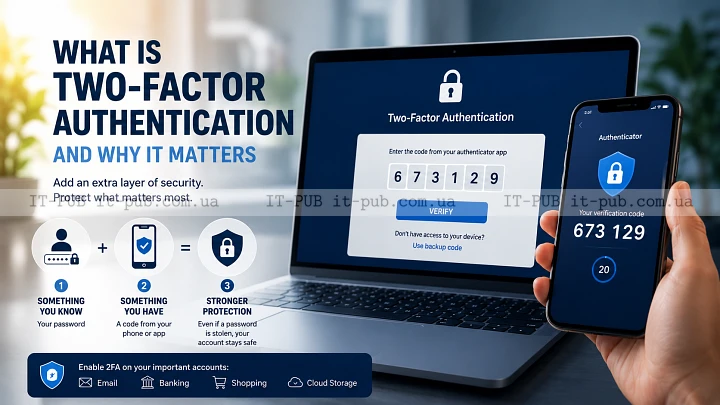
Two-factor authentication is one of the easiest ways to make your online accounts harder to break into. It adds one more step after your password, and that extra step can make a real difference.
If you use email, cloud storage, banking, social platforms, or work systems, it’s worth understanding how it works. The idea behind it is simple. The security benefit is not.
What two-factor authentication means
If you’re asking what is two-factor authentication, the short answer is this: it’s a login method that requires two different kinds of proof before access is granted. The first is usually something you know, like a password. The second is something you have, or sometimes something you are.
That second layer matters because passwords on their own are often not enough. They get guessed, reused, stolen through phishing, or exposed in data breaches. When two-factor authentication is turned on, a password alone should not be enough to get into the account.
In practical terms, that means an attacker needs more than your login credentials. They also need access to your phone, a security key, or another approved verification method.
How the login process works
For the user, the process usually starts like any normal sign-in. You enter your username and password. If they’re correct, the service asks for a second step.
That second step might be a code sent by text message, a code from an authenticator app, a push approval on a trusted device, or a physical security key. Some systems also support biometric checks such as a fingerprint or face scan, though those are often part of a broader authentication setup rather than a standalone second factor.
The key point is separation. The second factor should not be tied too closely to the password. If both can be stolen at the same time, the protection is much weaker.
Why passwords alone are not enough
Passwords still matter, but they remain one of the weakest points in account security. People reuse them across services, choose simple ones, or store them carelessly. Even strong passwords can end up exposed through phishing or breaches that happen somewhere else.
And attackers do not always need to crack anything. They may trick someone into entering a password on a fake sign-in page. They may use leaked credentials from another service. They may run automated login attempts against accounts that rely on weak or repeated passwords.
This is where 2FA security helps. It lowers the value of a stolen password. It does not make an account impossible to compromise, but it does raise the amount of effort needed to get in. For most people, that is a meaningful upgrade in login security.
Common types of two-factor authentication
There are several common authentication methods used for the second step, and each comes with its own trade-offs.
Text message codes are familiar and easy to use. A service sends a one-time code to your phone number, and you enter it during login. This is still better than having no second factor, but phone numbers can be vulnerable to SIM-swapping or interception in some situations.
Authenticator apps generate time-based codes directly on your device. Those codes change regularly and do not depend on mobile messages. Many security professionals prefer this option because it is generally stronger than SMS verification.
Push notifications ask you to approve a login attempt on a trusted device. That can be very convenient, though it still depends on the security of the device receiving the prompt.
Security keys are physical devices you insert or tap to confirm your identity. They are widely seen as one of the strongest forms of account protection because they are harder to phish and are tied directly to the login process.
Biometric checks use a fingerprint, face scan, or similar trait. They are convenient, but they are not always used as a standalone second factor. In many setups, biometrics unlock a device or app that then serves as the second proof.
Two-factor authentication and multi-factor authentication
These terms are closely related, but they are not the same thing. Two-factor authentication uses exactly two factors. Multi-factor authentication means two or more.
In everyday use, people often treat 2FA and multi-factor authentication as interchangeable. That’s understandable, but the distinction can matter when planning security. MFA is the broader category. 2FA is one specific version of it.
The goal is the same in both cases: make unauthorized access harder. In general, the more independent the factors are, the stronger the protection.
Where 2FA makes the biggest difference
Some accounts clearly deserve stronger protection than others. Email is near the top of the list because it often serves as the recovery point for other services. If someone gets into your email, they may be able to reset passwords elsewhere.
Financial accounts are another obvious priority. Banking, payment services, and investment platforms can expose real money when compromised.
Work accounts matter just as much. One stolen login can open access to internal systems, documents, and customer data. For a business, the damage from that can be far greater than the inconvenience of one extra login step.
Personal accounts should not be overlooked either. Social media, cloud storage, shopping accounts, and messaging services can all be abused if someone takes them over. That can lead to scams, impersonation, or access to saved contacts and payment details.
What two-factor authentication does not solve
Two-factor authentication helps a lot, but it does not solve every security problem.
If a device is already infected with malware, an attacker may be able to capture codes or hijack sessions in other ways. If a user approves a login prompt by mistake, the second factor is effectively bypassed through human error. If account recovery options are weak, those may become the easier target.
There is also a difference between protecting the login and protecting the account after login. If a session stays active for a long time, someone who gains access to that session may not need to sign in again right away.
So 2FA works best as part of broader account protection. Strong passwords, phishing awareness, secure devices, and solid recovery settings all still matter.
How to choose the best 2FA method
The best method depends on the account and the level of risk. For casual services, a text code may be acceptable if that is the only option available. For important accounts, authenticator apps or security keys are usually a better choice.
Convenience matters too. If a method is too awkward, people tend to avoid it. Security matters just as much, because the strongest option is only useful if it fits into daily life.
If a service offers several choices, pick the one that gives you a good balance of both. For highly sensitive accounts, it also makes sense to keep a backup method so losing one device does not leave you locked out.
Setting up two-factor authentication the right way
Turning on two-factor authentication is usually straightforward, but the setup details matter. Start with your most important accounts, especially email and financial services. Choose a method you can realistically keep using.
Store recovery codes safely. Many services give you backup codes when you enable 2FA, and those codes can be the difference between quick recovery and a lockout if you lose your phone or security key. Keep them somewhere secure, not alongside the account password.
It also helps to review your recovery settings. A strong second factor can be undermined by weak recovery options such as an old phone number or a backup email address you no longer use.
If possible, register more than one trusted method. That way, losing a device does not immediately become an access problem.
Common mistakes people make
A common mistake is treating 2FA as optional on important accounts. Another is turning it on for a few low-value services while leaving the most sensitive ones exposed.
Some people also rely on SMS codes for everything without thinking about stronger options. SMS is still better than nothing, but it is not the most robust choice.
Another mistake is ignoring alerts from the authentication system. If you get a login prompt you did not request, do not approve it. That can be an early sign that someone already knows your password and is trying to get through the second step.
Backup codes are another weak spot. Storing them in an unsafe place, or forgetting about them entirely, can create problems later. Recovery planning is part of good account protection.
Why businesses rely on it
For organizations, two-factor authentication is a practical defense against common attack paths. Phishing, password reuse, and stolen credentials are still frequent ways into business systems. Adding a second factor makes those attacks less effective.
It also helps protect remote access, cloud services, and admin tools. When employees sign in from different devices and locations, passwords alone rarely provide enough protection.
That said, tools are only part of the picture. Businesses still need training and policy. Security works better when people understand why a system is in place and how to use it correctly. A solid login process is one layer in a larger security strategy.
The role of 2FA in everyday digital safety
Two-factor authentication is not just for security teams or technical users. It is a simple habit that benefits almost anyone. Once it is set up, it usually becomes part of the routine rather than a burden.
Its value is mostly about resilience. If a password gets exposed, the account is not automatically lost. If someone falls for a phishing attempt and hands over credentials, the attacker still has another barrier to deal with.
And in many cases, that extra barrier is enough. Opportunistic attacks often depend on easy access. Two-factor authentication removes some of that ease, which is exactly why it matters.
Building better account protection over time
Good account protection is rarely about one perfect tool. It comes from layers that support each other. A strong password manager, careful handling of suspicious messages, updated devices, and two-factor authentication all play a role.
If you are deciding where to start, begin with the accounts that would cause the most damage if compromised. Then expand from there. The goal is not perfection. The goal is to make your accounts much harder to misuse.
So, what is two-factor authentication in the bigger picture? It is one of the clearest examples of a simple security measure that has real impact. It is easy to understand, available on many services, and effective against a wide range of common attacks. For anyone who uses the internet regularly, that makes it well worth enabling.