Apple Watch starts beta test of AI audio tools
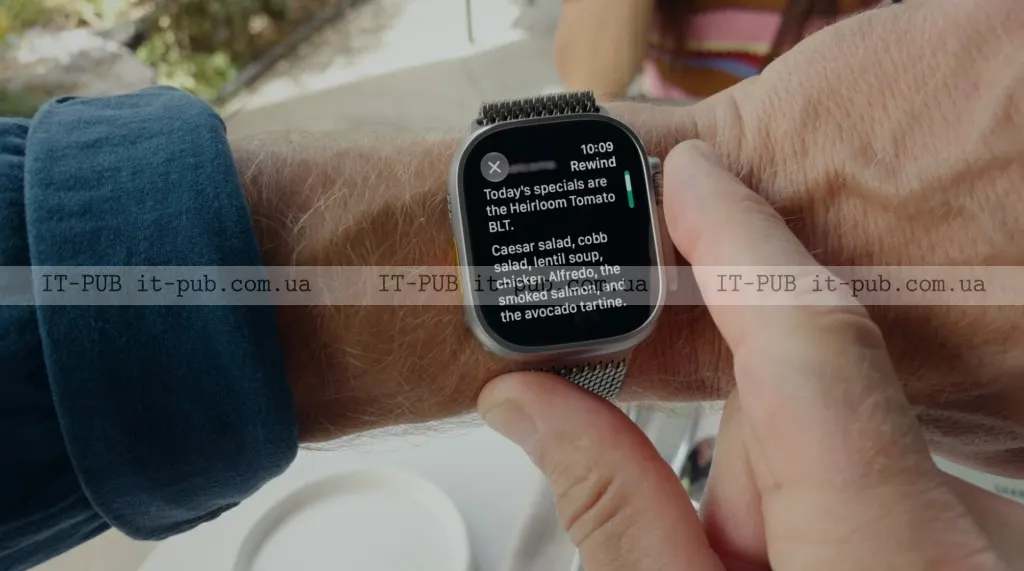
Apple is testing four opt-in Apple Watch features, including conversation recaps and 15-second text snippets, with privacy controls at the center.
Apple has begun beta testing a new set of AI-powered audio tools for the Apple Watch, an unusual step into features that listen to the world around the wearer. The system, called Audio Intelligence, can detect important sounds, identify music, and help users catch up on conversations or save notes. The most attention-grabbing part is also the most sensitive: two of the features are built to process human speech.
The rollout started Tuesday in the developer beta through the iOS 27.3 update, after Apple first introduced the technology at its Surprise and Shine hardware event in September. For now, the update has not yet reached the U.S. market, according to the source text. Apple announced the beta in a press release distributed in India, as IT-PUB News notes.
Audio Intelligence brings four opt-in tools to Apple Watch
Audio Intelligence includes four opt-in features for Apple Watch Series 12 users. Two focus on practical sound recognition. One can help deaf and hard-of-hearing users identify important sounds such as sirens, alarms, or doorbells. Another uses Apple’s Shazam service to recognize songs playing in the background and show the track name and artist.
The other two features go further by handling spoken conversations. Apple calls them Live Rewind and Siri Recaps. They are meant to help users keep up with what was said, remember details, and save information for later.
That is also where the feature set becomes more contentious. AI tools that record or summarize speech have already drawn criticism in other products, including Meta’s AI glasses and other AI wearables. Apple appears to be trying to offer similar convenience without creating the impression that it is quietly recording everything around the user.
Live Rewind turns the last 15 seconds into text
Live Rewind is meant for moments when someone misses part of a conversation. If a user did not catch a direction, a name, or a list of items, they can double-press the Apple Watch’s digital crown and see a text snippet of what was said in the last 15 seconds.
Apple gave examples such as following verbal directions or hearing a long list of specials at a restaurant. The snippet appears on the watch face and can be ignored, in which case it disappears permanently. It can also be saved to the standalone Siri app that arrived with iOS 27, which could make it useful for later reference.
Apple also says an “Ask Siri” option will appear below the snippet. That would let users ask about something in the text, such as an unfamiliar technical term or a detail they want clarified.
The company says the gesture is meant to be obvious to people nearby. When the user double-presses the digital crown, the watch plays an audible chime and shows an animation. Apple says that mix of sound, movement, and gesture is intended to signal that something has been captured from the conversation.
If the user does not save the snippet, it is automatically deleted after 30 seconds.
Siri Recaps summarizes conversations instead of recording them
Siri Recaps is the more ambitious of the two speech features. Rather than saving raw audio or producing a word-for-word transcript, Apple says it creates a short summary of a conversation along with bullet points highlighting key details.
Those bullet points may include dates, deadlines, pricing, payment plan information, and other factual points, depending on the conversation. Apple says the feature is meant to work like a person’s own notes, but without tone or emotion.
The company suggests it could help in meetings, parent-teacher conferences, personal training sessions, and other situations where someone needs to remember tasks or instructions but cannot stop to write them down. It may also be useful when a person’s hands are busy or when they need to stay focused on what is being said.
Apple says the feature will not identify speakers, save raw audio, or create a full transcript. It also will not run while a user is listening to music through headphones or using noise cancellation features.
At the end of the day, the watch prompts users to review any saved Siri Recaps and decide which ones to keep. They can be stored in the Notes app or exported to Journal if the content is more personal. If the user does nothing, the recaps are deleted within seven days. The same reminder appears when the user first unlocks the watch in the morning.
Apple makes privacy central to the rollout
Because the features listen to conversations, privacy sits at the center of Apple’s pitch. The company says users can enable Siri Recaps manually or set a schedule, such as allowing the feature only during work hours or turning it off at night. Even then, it can be switched off at any time from Control Center.
Apple also says Siri Recaps is designed to leave out sensitive information, including government-issued identifiers, financial and authentication data, certain personal identifiers, and any language that promotes self-harm.
The company’s technical explanation is meant to reinforce that message. Audio Intelligence for Apple Watch Series 12 and Apple Watch Ultra 4 relies on the S11 chip, the built-in microphone, Apple Intelligence models running on the iPhone, and Apple’s Private Cloud Compute. Apple says the watch uses an always-on processor with a secure enclave, a protected memory area that the rest of the operating system cannot access.
According to Apple, lightweight AI models on the watch first detect whether a conversation involving the wearer is happening. The audio is then transferred to the secure enclave on the iPhone. From there, on-device processing turns it into condensed text with filler words removed. That text is encrypted and sent to Private Cloud Compute to generate the recap, which is then returned to the phone. Apple says the recap and the material used to create it are deleted from PCC immediately afterward.
The company says the recaps available on the iPhone are accessible only to the user, not to Apple, and are encrypted when synced across the user’s Apple devices. The same process is used for the 15-second snippets generated by Live Rewind.
Apple says the new features should not affect battery life on either the watch or the phone. After the developer beta, the company plans to open the features to a public beta before releasing them to all users.
For Apple, this is a careful attempt to push AI deeper into everyday wearables without triggering the same privacy concerns that have followed other recording-capable devices. How users respond to that balance between convenience and intrusion may matter as much as the features themselves once testing expands.