A Practical Guide to Choose a Strong Password
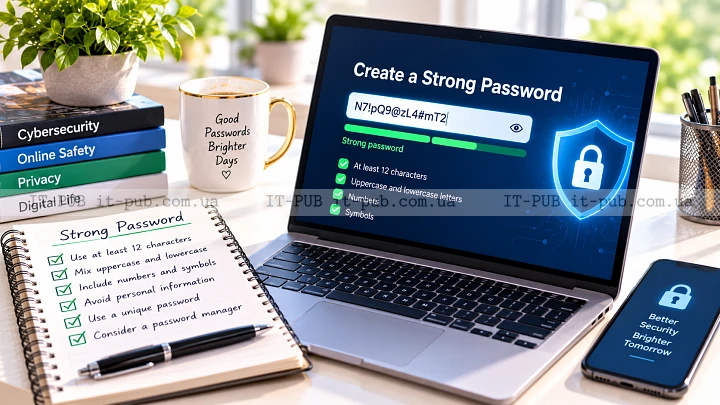
A weak password can put an entire account at risk. A good password manager makes stronger security much easier to live with. The hard part is finding the right balance between safety, convenience, and trust.
This guide breaks down how to choose a strong password and password manager in plain language. The focus is on practical habits that protect everyday accounts without turning security into a chore.
What makes a password strong
A strong password is difficult for both people and software tools to guess. In most cases, length matters more than clever tricks. A long password is usually safer than a short one with a few symbols tacked on at the end.
Simple patterns are a problem. Names, birthdays, pet names, keyboard sequences, and common words are all easy to predict. Passwords that only change one character from an older one are weak for the same reason. And if a password has been used before, it is already less safe than a new one.
What really matters is uniqueness. Every account should have its own password, so one breach does not open the door to everything else. Reusing passwords is one of the fastest ways to turn a small incident into a much bigger one.
Passphrases can be a smart option. A few unrelated words strung together are often easier to remember and harder to crack than a short, complicated-looking string. The catch is simple: it should not be a familiar phrase or anything connected to your personal life.
Why complexity alone is not enough
A lot of people still assume a secure password has to be packed with symbols. That is only partly true. Something like `Summer2024!` looks strong at first glance, but it follows a pattern attackers already know to try.
Real protection comes from unpredictability. If a password is long, unique, and not tied to obvious personal details, it becomes much harder to guess or attack automatically. Randomness helps. Length helps too.
This is also where password habits tend to break down. People come up with one “strong” password and reuse it everywhere because remembering dozens of logins is unrealistic. It is an understandable shortcut, and one of the main reasons password managers matter.
How to create passwords you can actually use
The best password is one you will not end up writing on paper or reusing out of frustration. For many people, a passphrase is the most practical option. A string of unrelated words can be both memorable and strong enough to resist guessing if it is long enough.
Another good approach is to let a password manager generate passwords for you. That removes the pressure of trying to create secure passwords by hand. It also avoids the predictable patterns people fall into without realizing it.
If you need to make a password yourself, stay away from personal references. Do not use your name, phone number, city, company, or anything visible on social media. Common substitutions are not enough either. Replacing “a” with “@” or “o” with “0” does little if the rest of the password is weak.
Important accounts deserve extra care. Email, banking, cloud storage, and work logins should all have different passwords, because a compromise there can lead to much more serious damage.
Why a password manager helps
A password manager keeps your passwords in one protected place and fills them in when needed. That means you do not have to remember every login yourself. In most cases, you only need one strong master password, or another secure method, to unlock the vault.
The biggest advantage is simple: unique passwords become realistic. Instead of relying on memory, you can let the manager generate and store long, random passwords for every account. That removes a lot of the temptation to reuse the same one across multiple sites.
It can save time too. Most password managers fill login forms, sync across devices, and help you spot weak or repeated passwords. For many people, that convenience is what makes better password best practices stick.
Still, it is just a tool. Choosing one carefully matters. The goal is to reduce risk, not shift all your trust into one place without asking how it works.
What to look for in a reliable password manager
A trustworthy password manager should protect the vault with strong encryption and a security model the company can explain clearly. You do not need to be deeply technical, but you should be able to understand, in plain language, how your data is protected.
Support for multi-factor authentication is another big plus. If someone gets your master password, that extra layer can make account takeover much harder. Since the master password protects everything else, this part of password manager security matters a lot.
Cross-device syncing is useful if you move between a phone, tablet, and computer. Just make sure that convenience is not coming at the expense of weaker protection. Good online account protection should not depend on choosing between security and usability.
It also helps when the app makes routine tasks easy. Generating passwords, replacing old ones, and organizing logins should not feel awkward. If the interface is frustrating, people stop using the tool properly, and even strong security features become less useful.
Some products also support secure notes, passkeys, or sharing for trusted family or team use. Not everyone needs those password manager features, but they can be valuable when handled carefully.
Security features that matter most
When comparing options, start with the basics. Encryption should be strong, and the provider should not be able to read the contents of your vault during normal operation. Put simply, your passwords should stay private even from the company storing them.
Multi-factor authentication is another feature worth prioritizing. It makes unauthorized access harder, especially if your master password is ever exposed somewhere else. If the manager also supports biometric unlocking on your device, that can add convenience without replacing the main layer of protection.
Recovery options matter too. If you lose access, there should be a sensible path back in that does not create an easy back door for attackers. Recovery should be secure, but it should still work for the real owner.
Automatic password generation is essential. A built-in checker that flags weak, reused, or exposed passwords is just as useful. These are the kinds of strong password tips that help people improve security without having to audit every login by hand.
How to judge trust without being technical
Most people are not going to read technical papers before picking a password manager. That is completely reasonable. You can still make a solid choice by paying attention to how clearly the company explains its security model and privacy practices.
Transparency counts. A good provider should be open about how data is stored, how the vault is protected, and what happens if you switch devices or lose access. Vague promises are not enough.
Reputation helps, but marketing should not be the deciding factor. Look for a product with a track record of stability and clear communication when security issues come up. No service is flawless. Honest communication is still a strong sign.
It is also worth avoiding tools that seem to collect more data than they need. A password manager should be focused on protecting credentials, not building a detailed picture of your activity.
Common password mistakes to avoid
The most common mistake is still password reuse. If one site is breached, attackers often try the same login on email, shopping, banking, and social accounts. That is why unique passwords matter so much.
Predictable passwords are another problem. Adding a number at the end or swapping a few letters for symbols does not suddenly make a weak password strong. Patterns are easy to recognize, especially when millions of people use the same tricks.
Storing passwords in insecure places creates risk too. Notes apps, spreadsheets, browser bookmarks, and sticky notes can all become weak points if they are not protected properly. In most cases, a password manager is the safer place for sensitive logins.
And people sometimes forget to secure the password manager itself. The master password should be strong and unique, and multi-factor authentication should be turned on when available. If the vault is the center of your account security, it deserves the most attention.
Browser saving versus a dedicated password manager
Browsers can save passwords, and for some people that is already better than reusing the same login everywhere. But a dedicated password manager usually gives you more control and better organization.
A browser may be enough for very simple needs, especially if you only use one device. A dedicated manager is usually more flexible. It tends to offer better password generation, broader syncing, and stronger tools for reviewing account security.
There is also a practical difference in how credentials are handled across devices and apps. A password manager is built specifically for that job. Browser storage is only one feature inside a much larger product. That does not make browser saving useless, but it does make it less complete.
Building a safer routine over time
Better password security is not a one-time fix. It is a routine.
Start with your most important accounts, especially email and financial services, because they can often be used to reset other passwords. Then move on to accounts that hold personal information or payment details. Replace reused passwords with unique ones, and let the password manager generate new credentials whenever possible. You do not have to do it all in one sitting.
It also helps to review saved logins from time to time. Old accounts you no longer use should be deleted or secured. Fewer active accounts usually means less risk to manage.
If an account supports multi-factor authentication, enable it. Passwords matter, but they work better when paired with another form of verification. That extra step can make a real difference if a password is ever exposed.
Choosing the right balance for your needs
There is no single perfect setup for everyone. A casual user, a freelancer, and an IT specialist may all need slightly different approaches. The best system is the one you will actually keep using.
For most people, the simplest answer is also the strongest: use unique passwords, store them in a password manager, and protect that manager with a strong master password and multi-factor authentication. That covers the most common risks without making everyday logins painful.
If you are comparing several options, focus on security design, ease of use, and reliable syncing before flashy extras. A tool you understand and trust is more useful than one packed with features you will never touch.
Good password habits do not need to be complicated. Once the system is in place, it usually saves time and reduces stress. More importantly, it gives your accounts a much better chance of staying private.