What Is an Operating System and How It Works
What is an operating system? It’s the core software that makes a device usable. Without it, a computer or phone would have no practical way to run programs, manage memory, or respond to what you do.
A computer operating system sits between the hardware and the apps you use every day. It keeps those layers working together, so you can open files, browse the web, print documents, and switch between tasks without seeing all the low-level work happening underneath.
The operating system as the device’s control center
A computer is made up of many physical parts: the processor, memory, storage, keyboard, screen, and network hardware. Each one has its own role, and each one needs instructions. The operating system acts as the control center that coordinates them.
When you click an icon, type on a keyboard, or connect to Wi‑Fi, the OS receives that input and determines what should happen next. Its job is not limited to launching programs. It also manages the environment those programs run in.
That’s what makes the operating system essential. Applications rely on it. Hardware relies on it too. Even basic actions like saving a file or changing screen brightness usually go through the OS first.
How an operating system works in simple terms
If you want an operating system explained simply, think of it as both a translator and an organizer. Hardware and software operate differently, and the OS bridges that gap.
When an app needs to show something on the screen, the operating system handles the request and passes instructions to the graphics hardware. When you open a file, it finds that file on storage and loads it into memory. If several programs are running at once, it decides how processor time is shared between them.
All of this happens quickly and mostly out of sight. You usually notice how an operating system works only when something goes wrong—when a device slows down, freezes, or runs short on resources. In normal use, the OS stays in the background and keeps the system stable.
The main jobs an operating system performs
The OS has a few core responsibilities, and together they cover most of what makes a device function smoothly.
One major area is process management. This means deciding how active programs get access to the processor. Since multiple applications may be running at the same time, the system has to divide attention in a way that is both fair and efficient.
Memory management is just as important. Programs need space in RAM while they run, and the operating system tracks what is already in use, assigns memory to apps, and helps keep them from interfering with each other.
File management is another key task. The OS organizes data on storage devices, keeps track of folders and files, and controls access so information is not lost or overwritten by accident.
It also handles device management. Printers, keyboards, monitors, cameras, audio hardware, and network adapters all depend on the OS to communicate properly. For that, it uses drivers—small software components that let the system work with specific hardware.
Security is part of the picture as well. The operating system usually controls user accounts, permissions, passwords, and access to system resources. That helps prevent one app or user from changing everything on the device without limits.
Why you rarely interact with the OS directly
Most people use an operating system all day without really thinking about it. What you usually see is the desktop, home screen, file manager, or settings menu. The deeper system work stays hidden.
That is intentional. The OS provides a user interface that makes the device easier to use. It might be graphical, with windows and icons, or text-based, where commands are typed manually. Either way, that interface is only one part of the system.
Underneath it is the part that handles background services, hardware communication, updates, task scheduling, and resource control. When that layer works well, the device simply feels natural to use.
Operating system examples across different devices
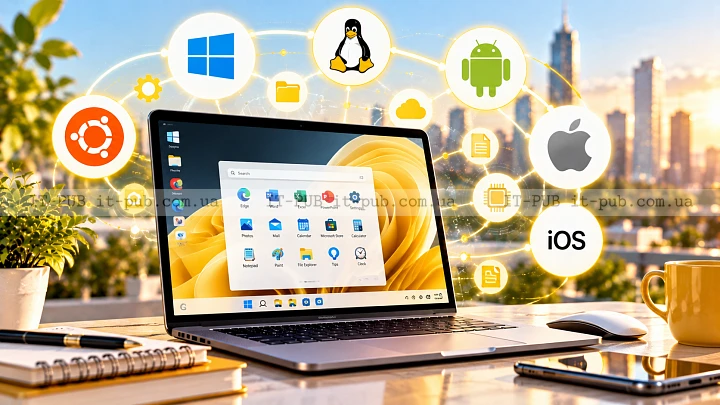
Operating system examples are not limited to desktop PCs. Operating systems are used in laptops, servers, tablets, phones, smart TVs, game consoles, watches, and many other connected devices.
On personal computers, the OS usually provides a full desktop environment and support for many kinds of software. On smartphones, it is built around touch input, mobile apps, battery efficiency, and wireless connectivity. On servers, the focus is often stability, remote access, and running many services at once.
The exact design depends on what the device is meant to do. A phone OS does not need to behave like a server OS, and a TV operating system does not need the same tools as a laptop. Still, the basic role stays the same: manage hardware and provide a platform for software.
The difference between system software and applications
An operating system is system software. In other words, it supports the device as a whole instead of serving just one task. Applications are different. They are built for specific purposes, such as writing documents, editing photos, or streaming media.
The OS makes those applications possible. A word processor usually does not control the keyboard directly or manage the screen by itself. It asks the operating system to do that. The same goes for browsers, games, messaging apps, and many other programs.
This separation is important because it keeps software organized. The operating system provides shared services that many apps can use, which reduces duplication and makes the device easier to manage.
Types of operating systems and how they differ
There are several broad types of operating systems, usually grouped by how they are used.
A desktop operating system is built for personal computers. It typically includes a graphical interface, multitasking support, and broad hardware compatibility. This is the kind many people picture first when they hear the phrase computer operating system.
A mobile operating system is designed for phones and tablets. It focuses on touch input, app delivery, battery life, sensor support, and wireless communication. The interface is usually simplified to fit smaller screens.
A server operating system is intended for machines that provide services to other computers over a network. It often emphasizes reliability, user management, security, and remote administration.
There are also embedded operating systems, used in devices such as routers, appliances, and industrial equipment. These systems are often specialized for a narrow range of tasks and may offer only limited interfaces.
What makes one operating system different from another
Operating systems can vary a lot, even when they do the same basic job.
One obvious difference is the interface. Some systems are built around windows, menus, and icons. Others lean more heavily on command-line tools, where users type instructions directly.
Compatibility is another factor. Some operating systems support a wide range of software and hardware. Others are more tightly controlled and work with fewer devices or apps. That affects flexibility, performance, and ease of use.
Security models differ too. Some systems give users more control over settings and software installation. Others are more restrictive, which can lower risk but also limit customization.
The update process can also shape the experience. Some operating systems update frequently and automatically. Others rely on manual installation or follow a slower release cycle. Those choices affect how much maintenance the system needs and how it feels to use over time.
Why operating systems need updates
An operating system is never really finished. It changes over time to fix bugs, improve security, support new hardware, and refine performance. Updates are how those changes reach users.
Without updates, a system can become unstable or exposed to security problems. New hardware may not work properly, and software may stop getting the support it expects. That is why keeping an OS current is usually the safer choice.
At the same time, updates need to be handled carefully. On important systems, especially business machines or servers, testing may be necessary before broad deployment. That helps reduce the risk of disruption from unexpected changes.
How the operating system affects performance
When a device feels slow, people often blame the app in front of them. Sometimes that is true, but the operating system has a major influence on performance.
It decides how memory is used, how many tasks can run at once, and how background activity is handled. If the OS is overloaded, poorly configured, or running on limited hardware, even simple tasks can start to feel sluggish.
A well-designed operating system can do the opposite. It can make modest hardware feel responsive by managing startup programs, background services, storage access, and power use in a balanced way. That balance is a big part of why one device feels smooth and another does not.
The role of the operating system in security
Security is one of the clearest reasons operating systems matter. The OS controls who can do what on a device. It separates users, limits access to sensitive parts of the system, and helps stop software from making unauthorized changes.
It also provides tools for authentication, including passwords, PINs, biometric checks, and account permissions. When an app asks for access to a camera, microphone, or file folder, the operating system is often the layer that decides whether that request should be allowed.
No OS is perfectly secure. Still, a well-maintained one can significantly reduce risk. Good protection depends on the operating system, the apps installed on it, and the habits of the person using the device.
Why learning the basics of an OS helps everyone
You do not need to work in IT to benefit from understanding the basics. Once you know what is an operating system and what it actually does, everyday tech decisions become easier.
It helps when choosing a new device, installing software, managing storage, or troubleshooting a problem. It also explains why the same task can work differently across devices. A file may open on one system and not on another. A setting may be easy to find on a phone but buried on a laptop. Those differences often come down to OS design.
For IT professionals, the importance is even more obvious. The OS affects deployment, support, security, automation, compatibility, and user experience. But even for non-specialists, understanding the basics makes technology feel a lot less opaque.
A simple way to remember what an operating system does
The shortest useful definition is this: an operating system is the software layer that allows hardware and applications to work together. It manages the device, supports the user, and gives programs the resources they need.
If hardware is the body of a computer, the operating system is the control layer that keeps the parts connected and coordinated. It responds to input, manages activity, and helps everything work as a system.
That is why it matters on almost every modern device. You may not always notice it, but nearly everything you do depends on it.