Laytr offers a private Pocket alternative on Apple
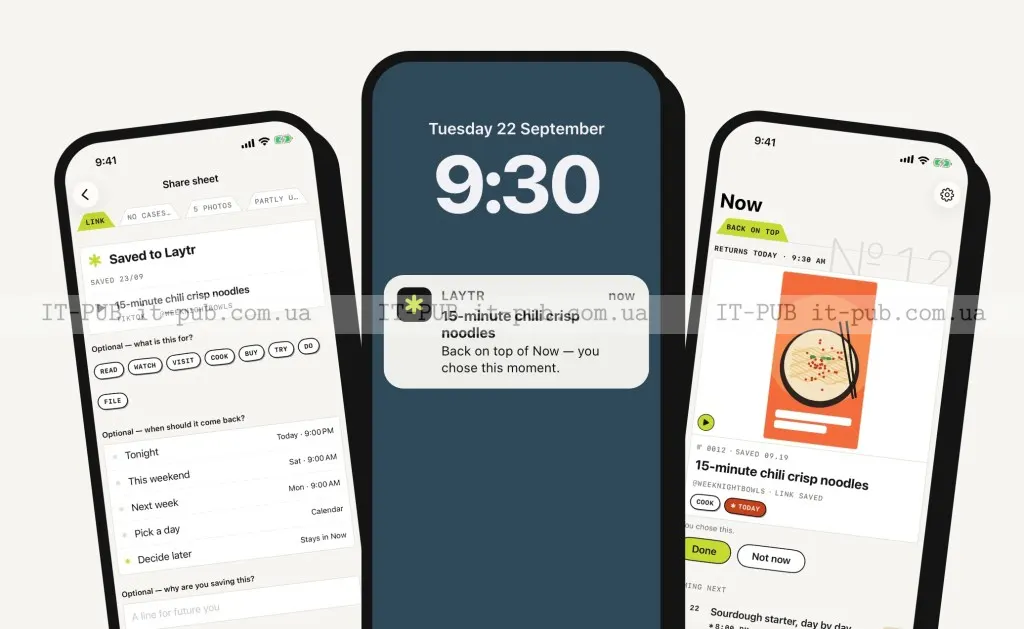
The new app saves links, files, and media on a user’s own device, syncs through iCloud, and lets former Pocket users import old archives.
Laytr has entered the post-Pocket market with a broader pitch than the usual “read it later” app. Instead of focusing only on articles, it lets users save almost anything they come across online — recipes, screenshots, videos, PDFs, bookmarks, and tabs. Privacy is central to the app’s design, with no account required and no server-side archive.
That could make it appealing not just to people replacing Pocket, but also to users who care about where their saved content ends up. Laytr keeps everything on the user’s own device and syncs across Apple devices through iCloud. The trade-off is clear: it skips some of the convenience features common in cloud services, including AI summaries and personalized feeds.
Laytr aims beyond saved articles
The app comes from Ontario-area indie developer Mostafa Talaat and is published under his company, Waitery Inc. Talaat said he decided to build Laytr after hearing about Pocket’s shutdown in August.
The timing matters. Pocket’s closure opened space for alternatives, and several apps have moved in to fill it. Laytr is trying to separate itself by going beyond saved articles and turning the product into a more general archive for online content.
In practice, that means users can keep different kinds of material in one place instead of saving only text to read later. The app automatically sorts those file types, which should make mixed archives easier to manage.
Laytr stores saves on-device, not on its own servers
Laytr’s main selling point is that it does not operate like a typical online service. Talaat said he built it without a server for privacy reasons, so users do not need to create an account and the developer cannot see what they save. As IT-PUB News notes, that also means the archive is not stored on a company-run backend.
“What you save says a lot about you, and I didn’t want to be holding it. Everything stays on your device and in your own iCloud,” Talaat said.
The archive stays private and local, but it can still move between Apple devices through iCloud. Saved content can be accessed on iPhone, iPad, and Mac without turning Laytr into a server-backed service.
That approach may appeal to people who are wary of handing over their reading habits, bookmarks, and browsing trail to a company. It also reflects a deliberate trade-off: more local control and privacy, fewer of the smart features that cloud apps often rely on.
Reminders and “cases” shape how Laytr organizes saves
Laytr is not just a storage app. It also includes reminders, so users can pick a date for a saved item to return to their attention later. That could be useful for local events, places to visit, or anything else tied to a specific day.
The app also groups saved items into collections called “cases.” According to Talaat, when users save something, Laytr asks when they want it back and then reminds them on that day.
There is also support for importing a user’s old Pocket export, which lowers the barrier for switching. For anyone with a large archive already built up, that may be one of the more practical parts of the pitch.
The app leaves out AI summaries and personalized feeds
Because Laytr is built around privacy, it deliberately skips some features now common in other apps. Talaat said it will not personalize a feed, and it will not use AI to summarize or automatically tag saved items.
That makes the product more limited in some ways, but also more defined in purpose. Laytr is positioning itself as an archive and reminder tool, not a recommendation engine or an AI reading assistant.
For some users, that may be a plus. Others may see it as a drawback, especially if they are used to services that automatically sort, explain, and surface content. Laytr is choosing a simpler model, and the privacy angle sits at the center of that choice.
Pricing, limits, and export options
Laytr is free to try, but the free tier is limited to 30 saved items. Users who want full access can subscribe to Premium for $1.99 per month or $14.99 per year. There is also a one-time lifetime option for $39.99, currently discounted to $24.99 until the end of December.
Talaat said the app will continue focusing on adding more languages over time.
There is another notable detail in the subscription model: if a user’s subscription lapses, their saves are not deleted. They just cannot add more items unless they resubscribe or reduce their archive to the 30-item limit of the free plan.
Laytr also gives users a way to leave. The full archive can be exported as a ZIP file, with readable Markdown and HTML for every item, note, tag, date, and collection. In a market where lock-in is a common concern, that export option may matter almost as much as the privacy pitch itself.
For now, Laytr is another sign that Pocket’s end has done more than create competition. It has pushed developers to rethink what a save-for-later app should be — and in Laytr’s case, the answer is a personal archive that stays with the user.